
Downloads
Manuals & Brochures
Sasams Latest Patch
v. 26.1.1
Older Sasams Versions: link
Sasams date format
Saspac ERP date format
Saspac ERP - Administration Manual
Saspac ERP - Subjects and Marks Manual
Saspac ERP - Markbook Manual
Saspac App Manual
vBooks - Textbook Management
Files
Please only update to newer versions of Sasams after we have
Sasams Full Installation
v. 26.1.1
Anydesk

If you call us for assistance, we may ask you to open AnyDesk in order for us to log in to your workstation and help you.
If you’ve never used Anydesk before, no need to worry. It’s quick and easy!
Step 1
▪ Go to Anydesk’s official website (click here!)
▪ Click the ‘download now’ button on Anydesk’s website. The file will start to download
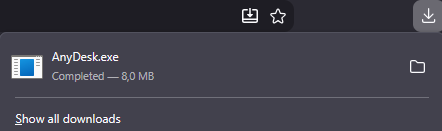
▪ Open the file once it has finished downloading
Step 2
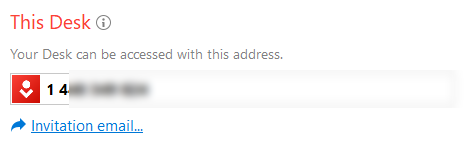
▪ Tell us the number displayed under “This Desk”
Step 3
▪ Click the green accept button once we attempt to connect
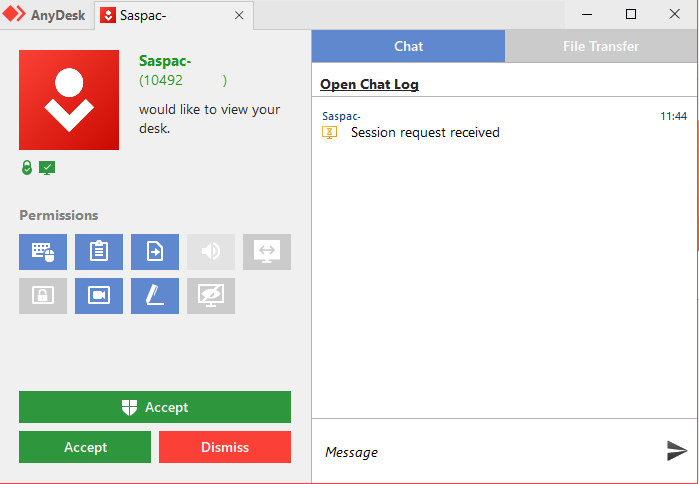
▪ Please only accept connections if you’ve confirmed that it’s us
SEAMLESSLY
CONNECTED

Connect. Import. Export
SASPAC works alongside other education systems, making it easier to exchange information and keep your school's data connected.